
What you’ll learn
- 1Derive distance from echo time and the speed of sound.
- 2Trigger the HC-SR04 correctly (10 µs pulse) and use a
pulseIntimeout. - 3Send START / STOP from Processing and sweep a servo without freezing the loop.
- 4Combine angle + distance into a polar plot (radar).
- HC-SR04
- Ultrasonic ranger. TRIG sends a 40 kHz burst; ECHO stays HIGH for the round-trip time.
- Speed of sound
- About 343 m/s in dry air at 20 °C. It rises ~0.6 m/s per °C.
- pulseIn()
- Waits for a pin to go HIGH (or LOW) and returns the duration in microseconds. Always pass a timeout.
- SG90
- Hobby servo.
Servo.write(0…180)asks for an angle. It needs 5 V and its own GND. - Blocking code
- A
for+delaythat hogsloop()so serial commands (STOP) are ignored until the sweep ends. - Polar coordinates
- A point as (distance, angle). Radar screens are polar plots.
Required equipment
| Component | Qty | Purpose |
|---|---|---|
| Arduino Uno | 1 | Timing + servo PWM |
| HC-SR04 | 1 | Distance |
| SG90 servo | 1 | Sweep / aim |
| Plastic holder | 1 | Mount the sensor on the horn |
| USB + both IDEs | 1 | Control + radar display |
The echo is a clock
The HC-SR04 clicks at ~40 kHz — too high to hear. The click hits a wall and comes back. Distance is half the trip, because the sound went there and back.
Exercise A — distance on a bar
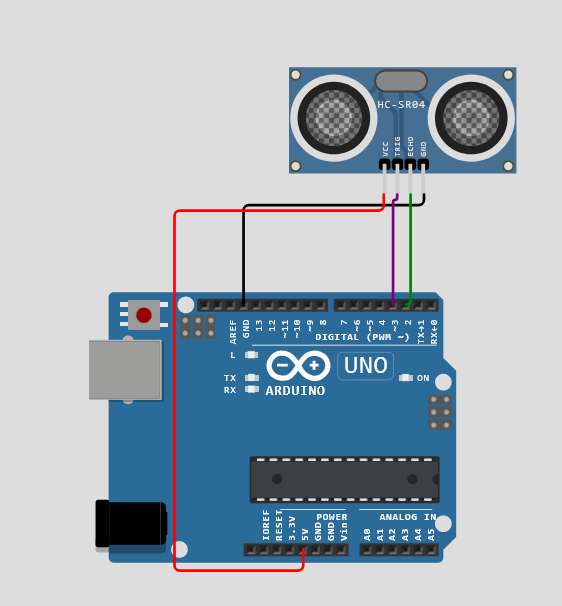
| HC-SR04 | Arduino |
|---|---|
| VCC | 5V |
| GND | GND |
| TRIG | D3 |
| ECHO | D2 |
const int trigPin = 3;
const int echoPin = 2;

void setup() {
  Serial.begin(9600);
  pinMode(trigPin, OUTPUT);
  pinMode(echoPin, INPUT);
}

void loop() {
  digitalWrite(trigPin, LOW);
  delayMicroseconds(2);
  digitalWrite(trigPin, HIGH);
  delayMicroseconds(10);
  digitalWrite(trigPin, LOW);

  long duration = pulseIn(echoPin, HIGH, 30000); // µs, 30 ms timeout
  float distance = duration * 0.0343 / 2.0;
  Serial.println(distance);
  delay(80);
}pulseIn now has a 30 000 µs timeout so a missing echo cannot freeze the board for a full second.import processing.serial.*;
Serial myPort;
float distance;
void setup() {
size(640, 200);
printArray(Serial.list());
myPort = new Serial(this, Serial.list()[0], 9600);
myPort.bufferUntil('\\n');
}
void draw() {
background(16);
fill(240);
textSize(22);
text("Distance: " + nf(distance, 0, 1) + " cm", 36, 48);
fill(62, 232, 216);
rect(36, 80, map(constrain(distance, 0, 200), 0, 200, 0, width - 80), 36, 4);
}
void serialEvent(Serial p) {
String data = trim(p.readStringUntil('\\n'));
distance = float(data);
}Exercise B — START / STOP from Processing
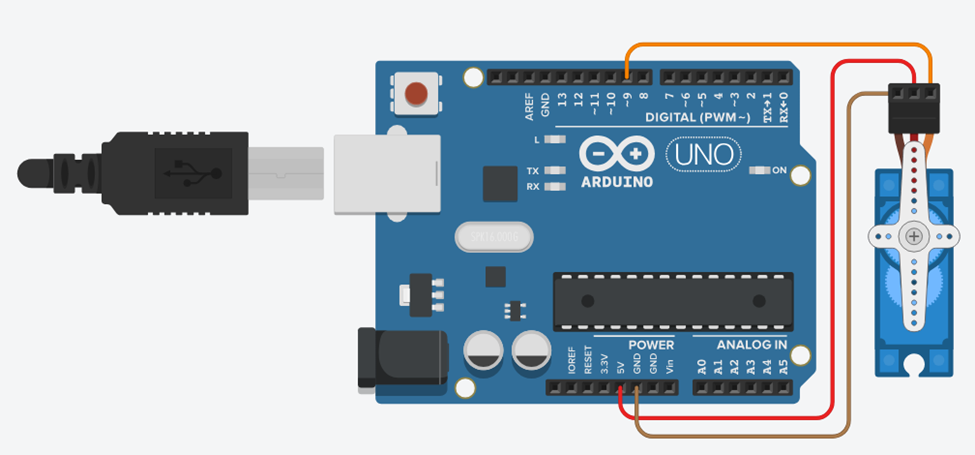
| Servo wire | Arduino |
|---|---|
| Brown / black (GND) | GND |
| Red (VCC) | 5V |
| Orange / yellow (signal) | D9 |
The original handbook swept with two blocking for loops. STOP sat in the serial buffer until the horn finished 180°. The sketch below moves one degree per loop and checks serial every time.
#include <Servo.h>

Servo servo;
bool sweeping = false;
int angle = 0;
int dir = 1;

void setup() {
  Serial.begin(9600);
  servo.attach(9);
  servo.write(0);
}

void loop() {
  if (Serial.available()) {
    String command = Serial.readStringUntil('\\n');
    command.trim();
    if (command == "START") sweeping = true;
    else if (command == "STOP") sweeping = false;
  }

  if (sweeping) {
    angle += dir;
    if (angle >= 180) { angle = 180; dir = -1; }
    if (angle <= 0) { angle = 0; dir = 1; }
    servo.write(angle);
    delay(12);
  }
}import processing.serial.*;
Serial myPort;
boolean isSweeping = false;
void setup() {
size(420, 220);
printArray(Serial.list());
myPort = new Serial(this, Serial.list()[0], 9600);
textAlign(CENTER, CENTER);
}
void draw() {
background(24);
fill(230);
textSize(18);
text("Servo control", width / 2, 36);
drawButton("START", 70, 100, isSweeping);
drawButton("STOP", 240, 100, !isSweeping);
}
void drawButton(String label, int x, int y, boolean active) {
fill(active ? color(62, 200, 140) : color(50));
rect(x, y, 110, 48, 8);
fill(active ? 10 : 230);
text(label, x + 55, y + 24);
}
void mousePressed() {
if (mouseX > 70 && mouseX < 180 && mouseY > 100 && mouseY < 148) {
myPort.write("START\\n");
isSweeping = true;
} else if (mouseX > 240 && mouseX < 350 && mouseY > 100 && mouseY < 148) {
myPort.write("STOP\\n");
isSweeping = false;
}
}Exercise C — distance aims the servo
A common kit build: if something is closer than 50 cm, turn the horn to 90°; otherwise park at 0°. TRIG/ECHO move to D6/D7 in this example so you can keep the servo on D9.
#include <Servo.h>

const int TRIG_PIN = 6;
const int ECHO_PIN = 7;
const int SERVO_PIN = 9;
const int THRESHOLD_CM = 50;

Servo servo;

void setup() {
  Serial.begin(9600);
  pinMode(TRIG_PIN, OUTPUT);
  pinMode(ECHO_PIN, INPUT);
  servo.attach(SERVO_PIN);
  servo.write(0);
}

void loop() {
  digitalWrite(TRIG_PIN, HIGH);
  delayMicroseconds(10);
  digitalWrite(TRIG_PIN, LOW);

  float duration = pulseIn(ECHO_PIN, HIGH, 30000);
  float distance = 0.017 * duration;

  servo.write(distance > 0 && distance < THRESHOLD_CM ? 90 : 0);

  Serial.print("distance: ");
  Serial.print(distance);
  Serial.println(" cm");
  delay(80);
}distance: 42.0 cm — not a bare number. Write a Processing sketch that strips the text, shows the number, draws a bar, and could later send START/STOP if you add buttons.Exercise D — radar scanner
Mount the HC-SR04 on the servo horn. Arduino sweeps 0–180°, measures, and prints angle,distance. Processing plots each hit in polar coordinates. This is a favourite Digital Challenge project.
#include <Servo.h>

Servo myServo;
const int trigPin = 9;
const int echoPin = 10;

void setup() {
  Serial.begin(9600);
  myServo.attach(6);
  pinMode(trigPin, OUTPUT);
  pinMode(echoPin, INPUT);
}

void loop() {
  for (int angle = 0; angle <= 180; angle += 2) {
    myServo.write(angle);
    delay(40);
    digitalWrite(trigPin, LOW);
    delayMicroseconds(2);
    digitalWrite(trigPin, HIGH);
    delayMicroseconds(10);
    digitalWrite(trigPin, LOW);
    long duration = pulseIn(echoPin, HIGH, 30000);
    float distance = duration * 0.0343 / 2.0;
    Serial.print(angle);
    Serial.print(",");
    Serial.println(distance);
  }
}pulseIn. Prints angle,distance once per step. After 180° the loop restarts at 0 — add a down-sweep if you want a smooth return.import processing.serial.*;
Serial myPort;
int angle;
float distance;
void setup() {
size(640, 400);
printArray(Serial.list());
myPort = new Serial(this, Serial.list()[0], 9600);
myPort.bufferUntil('\\n');
background(6);
}
void draw() {
// fade so old blips die out
noStroke();
fill(6, 18);
rect(0, 0, width, height);
float r = map(constrain(distance, 0, 100), 0, 100, 0, 260);
float x = width / 2 + r * cos(radians(angle));
float y = height - 20 - r * sin(radians(angle));
fill(62, 232, 216);
ellipse(x, y, 6, 6);
}
void serialEvent(Serial p) {
String data = trim(p.readStringUntil('\\n'));
String[] parts = split(data, ",");
if (parts.length == 2) {
angle = int(parts[0]);
distance = float(parts[1]);
}
}Student tasks
Troubleshooting
| Problem | Likely cause | Fix |
|---|---|---|
| Distance always 0. | Timeout (soft target) or TRIG/ECHO swapped. | Aim at a wall. Swap the two signal wires. Check 5 V. |
| Servo jitters / Uno resets. | The motor brown-out the USB 5 V rail. | External 5 V for the servo, common GND. |
| STOP does nothing for two seconds. | Blocking for loops from the original handbook. | Use the one-step-per-loop sketch. |
| Radar paints a spiral in the wrong place. | cos/sin origin or degrees vs radians. | Use radians(angle) and put the origin at the bottom centre. |
Exercises
How far?
pulseIn returns 2915 µs. Using 343 m/s, how far is the object in centimetres?
Cold classroom
The code assumes 343 m/s. The room is 10 °C (v ≈ 337.4 m/s). A wall is truly 100 cm away. What distance does the sketch print, and what is the % error?
STOP is late
A student used the original blocking sweep. Explain in 4 sentences why STOP waits, then write the non-blocking idea in two lines of pseudocode.
for (angle = 0; angle <= 180; angle++) { servo.write(angle); delay(10); } does not call Serial.available() for 1.8 s. The STOP line sits in the UART buffer. Pseudocode: each loop: read serial → update sweeping flag → if sweeping, angle += dir, write once, delay 12 ms.Parse a messy line
Arduino prints distance: 42.0 cm. Write serialEvent that extracts 42.0. Do not crash on distance: 0.0 cm or a timeout line.
splitTokens(data, " :cm") or find the first number with a small scan.void serialEvent(Serial p) {
String data = trim(p.readStringUntil('\\n'));
String[] bits = splitTokens(data, " :cm");
for (int i = 0; i < bits.length; i++) {
if (bits[i].length() > 0 && Character.isDigit(bits[i].charAt(0))) {
distance = float(bits[i]);
break;
}
}
}Polar plot one point
Window 600×600, origin at (300, 580). Angle 45°, distance 50 cm mapped onto r = 0…250 for 0…100 cm. Compute x and y of the blip.
Parking sensor UX
Design a Processing UI for a reversing sensor: three zones (<30, 30–80, >80 cm), colour, optional beep, and a frozen “HOLD” button that stops the servo. Sketch the layout and list the serial messages in both directions.
angle,distance or just distance. PC → Arduino: START, STOP, maybe HOLD. UI: big number, coloured bar, zone chips, mute toggle. Beep interval shortens as distance falls (map 80→30 cm onto 800→80 ms). HOLD sends STOP and freezes the last bar.Self-check quiz
- Q01
We divide the echo time by 2 because…
- Q02
A 10 µs HIGH on TRIG…
- Q03
pulseIn(pin, HIGH)with no timeout can… - Q04
The original START/STOP sweep ignored STOP because…
- Q05
Radar serial format in this lab is…
- Q06
x = r cos θ, y = r sin θ is…
Real world & extensions
- +Colour blips red under 30 cm, amber under 60 cm.
- +Play a beep in Processing when anything is closer than 20 cm.
- +Log
millis,angle,distancefor a heatmap of the room.
| Subject | Connection |
|---|---|
| Physics | v = d/t, reflection, temperature dependence of sound. |
| Mathematics | Polar coordinates: x = r cos θ, y = r sin θ. |
| CS | Non-blocking state machines vs blocking loops. |
Reflection & conclusion
Where did the radar “miss” objects, and what were those objects made of?
Why is a timeout kinder to a classroom demo than a 1 s freeze?
A car parking sensor beeps faster as you approach. Which Processing function would you use to map distance to beep interval?
You timed a sound, aimed a motor, and drew space. That is physics, control and graphics on one USB cable.