
What you’ll learn
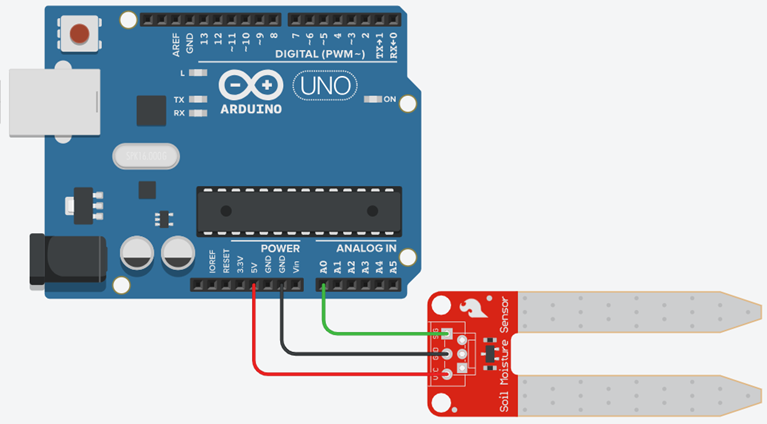
- 1Wire a 3-pin soil probe (VCC, GND, AOUT→A0) and read it.
- 2Calibrate dry / damp / wet for the probe on your desk — do not trust a datasheet.
- 3Invert
map()so a falling analog value still grows a “wetter” bar. - 4Design an alert that would later drive a pump or a buzzer.
- Capacitive probe
- Measures soil as a dielectric. The electronics stay out of the water, so it lasts longer.
- Resistive probe
- Two exposed legs. Current flows through damp soil. Cheap, rusts, the handbook figure looks like this.
- Calibration
- Recording real readings in known states (dry cup, damp cup, wet cup) so 0–1023 becomes a meaning.
- Hysteresis
- Two thresholds — on and off — so a pump does not chatter at one magic number.
Required equipment
| Component | Qty | Purpose |
|---|---|---|
| Arduino Uno | 1 | ADC |
| Soil moisture probe | 1 | Capacitive v1.2 or resistive fork |
| Three cups of soil / kitchen towel | 3 | Dry, damp, wet calibration |
| USB + both IDEs | 1 | Display |
Wet is usually a smaller number
Most classroom probes output a higher voltage in dry media and a lower voltage when wet. analogRead of ~800–950 is “leave it”, ~500 is “fine”, ~300 is “soaked”. Your board will differ. That is why this lab starts with three cups, not with a formula.
DRY = 880, WET = 340. The raw number falls as the soil gets wetter — the bar still grows.
Arduino — send the raw reading
| Probe pin | Arduino |
|---|---|
| VCC | 5V (or 3.3 V if the module insists) |
| GND | GND |
| AOUT | A0 |
const int sensorPin = A0;

void setup() {
  Serial.begin(9600);
}

void loop() {
  int moisture = analogRead(sensorPin); // often 1023 dry → ~300 wet
  Serial.println(moisture);
  delay(300);
}Processing — invert the bar
map(moisture, 1023, 300, 0, 360) reads backwards on purpose: a falling ADC still grows a “wetter” bar. Replace 1023 and 300 with your dry and wet averages.
import processing.serial.*;

Serial myPort;
int moisture = 0;
int DRY = 900;  // replace after calibration
int WET = 320;

void setup() {
  size(500, 240);
  printArray(Serial.list());
  myPort = new Serial(this, Serial.list()[0], 9600);
  myPort.bufferUntil('\\n');
}

void draw() {
  background(18);
  float pct = constrain(map(moisture, DRY, WET, 0, 100), 0, 100);
  fill(230);
  textSize(20);
  text("Soil moisture  " + moisture + "   " + int(pct) + " %", 32, 48);

  fill(pct < 25 ? color(255, 92, 77) : color(124, 255, 178));
  rect(32, 90, map(pct, 0, 100, 0, 420), 40, 4);
  if (pct < 25) {
    fill(255, 92, 77);
    text("DRY — water the plant", 32, 170);
  }
}

void serialEvent(Serial p) {
  String val = trim(p.readStringUntil('\\n'));
  if (val.matches("\\\\d+")) moisture = int(val);
}Student tasks
Troubleshooting
| Problem | Likely cause | Fix |
|---|---|---|
| Reading never changes. | You are holding the PCB, not the legs, or AOUT is not on A0. | Only the exposed probe goes in the media. Check the three wires. |
| Bar is backwards. | map used 300→1023 instead of 1023→300. | Invert the from-range, or map to 100−pct. |
| Numbers wander in the same cup. | Uneven moisture, air pockets, corroded legs. | Stir, wait 10 s, average 10 samples. |
Exercises
Which way does the number go?
You dip a typical classroom probe from dry potting mix into a wet cup. Does analogRead rise or fall? Why did the Processing bar still get longer in the starter sketch?
map(moisture, DRY, WET, 0, 100) has DRY > WET, so a smaller input maps to a larger output. The bar follows wetness, not voltage.Percent wet
Your calibration: DRY = 880, WET = 340. A reading is 610. What % wet is constrain(map(610, 880, 340, 0, 100), 0, 100)?
Three-cup lab sheet
Fill in a table: medium (dry soil, damp soil, wet soil, cup of water, open air) × 10 readings × average. Then choose DRY and WET for your Processing sketch. Photograph the table or type it into the handbook.
- 01Wipe the probe between cups.
- 02Wait 8 seconds after dipping before you record.
- 03Average 10 samples — do not pick the prettiest one.
- 04Open air is not the same as dry soil. Use dry soil as DRY if the plant will live in soil.
Smooth the jitter
Average the last 8 analog readings on Arduino before printing. Keep the serial contract as one integer per line.
const int N = 8;
int buf[N];
int i = 0;

void loop() {
  buf[i] = analogRead(A0);
  i = (i + 1) % N;
  long sum = 0;
  for (int k = 0; k < N; k++) sum += buf[k];
  Serial.println(sum / N);
  delay(50);
}Don’t chatter the pump
A single threshold if (reading > 700) pumpOn(); else pumpOff(); will flip the relay every few hundred milliseconds as the reading hovers. Design hysteresis: pick two numbers and write the if logic. Explain why plants (and relays) prefer this.
Self-check quiz
- Q01
On most classroom probes, wet soil makes
analogRead… - Q02
You should calibrate because…
- Q03
map(v, 900, 300, 0, 100)when v = 900 returns… - Q04
A resistive probe left in water for a week…
- Q05
Hysteresis uses…
Real world & extensions
- +Add a buzzer on D8 when
pct < 20. - +Two probes (A0, A1) for two pots — a competitive “who forgot to water?” dashboard.
- +Save a 10-minute CSV and fit a drying curve.
| Subject | Connection |
|---|---|
| Biology | Wilting point vs field capacity — plants care about water in the root zone, not a raw ADC. |
| Physics | Dielectric constant of water vs air (capacitive); ionic conduction (resistive). |
| CS | Calibration constants belong in named variables, not magic numbers. |
Reflection & conclusion
Which cup surprised you — was “damp” closer to dry or to wet?
If you built a pump next week, would you switch on raw ADC or on calibrated %? Why?
A farmer waters at dawn. How would you log 24 h of moisture with the same serial line?
You closed the workshop the way you opened it: a sensor, a one-line protocol, a picture. The only new skill was calibration — deciding what the numbers mean in the real world.