
What you’ll learn
- 1State Ohm’s law and the divider formula that matches this wiring.
- 2Explain why the unknown resistor sits on the 5 V side in the handbook figure.
- 3Compute R_x from V_A0 and discuss when the measurement is accurate.
- 4Guard against a missing resistor (open circuit → do not divide by zero).
- Ohm’s law
- V = I × R. Voltage, current and resistance are three faces of one relationship.
- Known / reference resistor
- The resistor whose value you trust (here 1 kΩ). You calculate the other one from it.
- Tolerance
- A 1 kΩ ±5 % resistor may actually be 950–1050 Ω. That error transfers into R_x.
- Open circuit
- No path for current.
analogReadsits near 0 or 1023 and the formula explodes — guard it.
Required equipment
| Component | Qty | Purpose |
|---|---|---|
| Arduino Uno | 1 | ADC |
| Known resistor (1 kΩ) | 1 | Reference |
| Unknown resistor | 1 | The one you measure |
| Breadboard + jumpers | 1 | Divider |
| USB + both IDEs | 1 | Display |
One formula — the one that matches the figure
The original handbook wrote two opposite formulas. The Fritzing figure labels the unknown on the 5 V side and the known toward GND. The firmware below follows that figure.
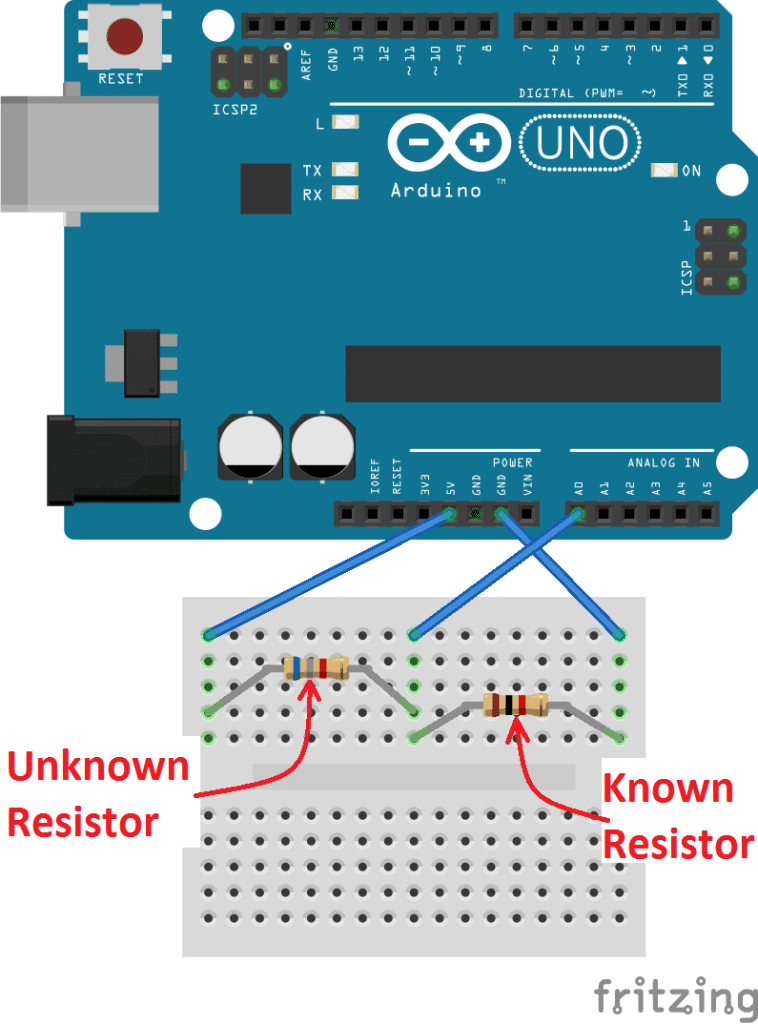
Accuracy is best when R_x ≈ R_known. If you measure 1 MΩ against a 1 kΩ reference, V_A0 is a few millivolts — one ADC step is a huge error. Choose a known resistor in the same decade as the unknown.
analogRead = 320
R_x = 1.00 kΩ × (5 / 1.564 − 1) = 2.20 kΩ
Arduino — solve for R_x
| Lead | Goes to |
|---|---|
| Unknown resistor | 5V → A0 (junction) |
| Known 1 kΩ | A0 → GND |
| A0 | The junction of the two resistors |
const int analogPin = A0;
const float Vin = 5.0;
const float Rknown = 1000.0; // ohms — change if you use another reference

void setup() {
  Serial.begin(9600);
}

void loop() {
  int raw = analogRead(analogPin);
  if (raw < 2) {          // open circuit / missing unknown
    Serial.println(-1);
    delay(400);
    return;
  }
  float Vout = (raw * Vin) / 1023.0;
  float Rx = Rknown * (Vin / Vout - 1.0);
  Serial.println(Rx);
  delay(400);
}Processing — units and range
import processing.serial.*;

Serial myPort;
float resistance = 0;

void setup() {
  size(520, 240);
  printArray(Serial.list());
  myPort = new Serial(this, Serial.list()[0], 9600);
  myPort.bufferUntil('\\n');
}

void draw() {
  background(18);
  fill(240);
  textSize(20);
  text("Measured resistance", 36, 56);
  textSize(36);
  if (resistance < 0) {
    fill(255, 92, 77);
    text("OPEN — check wiring", 36, 120);
  } else {
    text(formatOhms(resistance), 36, 120);
  }
}

String formatOhms(float r) {
  if (r >= 1e6) return nf(r / 1e6, 1, 2) + " MΩ";
  if (r >= 1000) return nf(r / 1000, 1, 2) + " kΩ";
  return nf(r, 1, 1) + " Ω";
}

void serialEvent(Serial p) {
  String val = trim(p.readStringUntil('\\n'));
  resistance = float(val);
}Student tasks
Troubleshooting
| Problem | Likely cause | Fix |
|---|---|---|
| Always −1 or always huge. | Unknown and known swapped, or a loose jumper. | Unknown on 5 V side. Re-seat A0 on the junction. |
| 20–30 % error on a 100 kΩ part. | 1 kΩ reference is the wrong decade. | Use 10 kΩ or 100 kΩ as R_known. |
| Reading drifts. | You are holding the resistor leads — your skin is a parallel path. | Use the breadboard, not your fingers. |
Exercises
Do the algebra
R_known = 1000 Ω, V_A0 = 2.0 V, V_in = 5.0 V, unknown on the 5 V side. Find R_x.
What does the ADC see?
R_x = 2.2 kΩ, R_known = 1.0 kΩ, unknown on 5 V side. Compute V_A0 and analogRead.
Why not measure 1 MΩ with 1 kΩ?
In 5–6 sentences, explain why a 1 kΩ reference is a bad choice for a 1 MΩ unknown. Mention V_A0 and one ADC step (≈ 4.9 mV).
Infinity on the screen
Someone unplugged the unknown resistor. Processing prints Infinity Ω. Point to the line that blew up and write the guard.
float Vout = (raw * 5.0) / 1023.0;
float Rx = 1000.0 * (5.0 / Vout - 1.0);
Serial.println(Rx);5.0 / Vout is infinity. Send a sentinel (−1) and let Processing print OPEN.if (raw < 2) { Serial.println(-1); return; }
float Vout = (raw * 5.0) / 1023.0;
Serial.println(1000.0 * (5.0 / Vout - 1.0));Range picker
Processing keys 1, 2, 3 send "K,1000\n", "K,10000\n", "K,100000\n". Arduino updates Rknown when a line starts with K. Keep printing R_x as a number.
Serial.readStringUntil and startsWith("K,"). On Processing keyPressed().float Rknown = 1000. Each loop, if serial is available, read a line; if it starts with K,, parse the rest as the new known value. Processing’s keyPressed writes the matching command.Self-check quiz
- Q01
With unknown on the 5 V side, R_x equals…
- Q02
Best accuracy when…
- Q03
A 1 kΩ ±5 % reference means R_known might be…
- Q04
Sending −1 over serial in this lab means…
- Q05
Fingers on the leads make the reading…
Real world & extensions
- +Colour-code quiz: hide the bands, measure, guess the colours.
- +Measure a potentiometer as you turn it — a live ohm sweep.
- +Compare three “1 kΩ” resistors from the kit and plot the spread.
| Subject | Connection |
|---|---|
| Physics | Ohm’s law, series circuits, measurement uncertainty. |
| Mathematics | Rearranging V = Vin · R2/(R1+R2); percentage error. |
Reflection & conclusion
Which error was bigger on your desk — the resistor’s colour-code tolerance, or the ADC?
How would you explain “choose a known resistor in the same decade” to a year-9 student?
A multimeter uses several known resistors and a rotary switch. Which lab extension is that?
You did not buy an ohm meter. You built one from a law you already knew. That is the whole Digital Challenge in one sentence.