
What you’ll learn
- 1Install an Arduino library (Adafruit DHT) and explain why libraries exist.
- 2Wire a digital sensor and name the job of a pull-up resistor.
- 3Define relative humidity in one sentence a classmate would understand.
- 4Send two numbers on one serial line and parse them in Processing.
- 5Add a colour-coded alarm when a reading crosses a threshold.
- DHT11
- A low-cost digital sensor for temperature (0–50 °C, ±2 °C) and relative humidity (20–90 % RH, ±5 %).
- Relative humidity (RH)
- How much water vapour the air holds compared with the maximum it could hold at that temperature, in %.
- Library
- Ready-made code you include so you do not have to speak the sensor’s protocol yourself.
- Pull-up resistor
- A resistor that keeps a signal line HIGH when nothing is pulling it LOW. Needed on a bare 3-pin DHT11.
- NaN
- “Not a Number” — what
dht.readTemperature()returns when the read failed. Test withisnan(). - CSV
- Comma-separated values. One line, two numbers:
24.5,61. - serialEvent()
- A Processing function that runs when a full serial line arrives. Safer than reading inside
draw().
Required equipment
| Component | Qty | Purpose |
|---|---|---|
| Arduino Uno | 1 | Microcontroller |
| DHT11 sensor | 1 | Temperature + humidity |
| 10 kΩ resistor | 1 | Pull-up (bare 3-pin sensor only) |
| Breadboard + jumpers | 1 | Prototyping |
| USB cable | 1 | Power + serial |
| Arduino IDE + Processing | 1 | Firmware + visualisation |
What you are actually measuring
The DHT11 is a digital sensor. Inside it sits a tiny humidity cell and a thermistor. A chip on the package converts both readings into a timed pulse train. You do not read a voltage on A0 — you ask a library to decode that pulse train on a digital pin.
Relative humidity, in human words
Warm air can hold more water vapour than cold air. Relative humidity is “how full is the air’s water tank right now?” That is why a cold bottle from the fridge sweats: the air next to the glass cools, its tank shrinks, and leftover water condenses.
The serial contract
Arduino and Processing must agree on a format. In this lab the contract is one line, two floats, comma in the middle, newline at the end:
24.50,61.00Wire the sensor
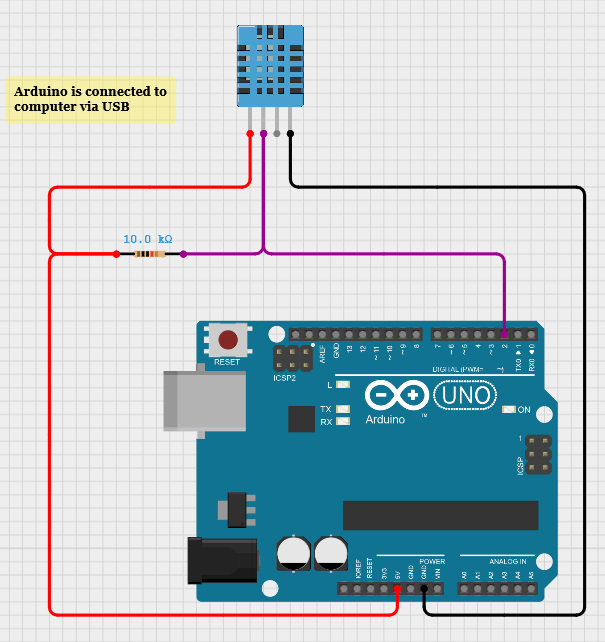
| DHT11 pin | Arduino pin |
|---|---|
| VCC | 5V |
| GND | GND |
| DATA | Digital pin 2 |
Close the Arduino Serial Monitor before you run Processing. Only one program can own the COM port.
- 01In the Arduino IDE open Sketch → Include Library → Manage Libraries.
- 02Search for “DHT sensor library” by Adafruit.
- 03Install it. Accept Adafruit Unified Sensor when asked.
Arduino — read and send
#include "DHT.h"

#define DHTPIN 2
#define DHTTYPE DHT11

DHT dht(DHTPIN, DHTTYPE);

void setup() {
  Serial.begin(9600);
  dht.begin();
}

void loop() {
  float humidity = dht.readHumidity();
  float temperature = dht.readTemperature(); // Celsius

  if (isnan(humidity) || isnan(temperature)) {
    Serial.println("Failed to read from DHT sensor!");
    return;
  }

  Serial.print(temperature);
  Serial.print(",");
  Serial.println(humidity);
  delay(2000);
}Serial.println() adds the newline. Processing will wait for that newline before it tries to parse. Never put a space after the comma unless you also trim it on the other side.Processing — a live dashboard
The original sketch read serial inside `draw()`. That works until a half-line arrives and float() blows up. The version below uses bufferUntil('\n') and serialEvent() — the same pattern you will reuse in every later lab.
import processing.serial.*;

Serial myPort;
float temperature, humidity;

void setup() {
  size(640, 360);
  printArray(Serial.list());
  myPort = new Serial(this, Serial.list()[0], 9600); // change index if needed
  myPort.bufferUntil('\\n');
}

void draw() {
  background(16);
  fill(240);
  textSize(22);
  text("Temperature: " + nf(temperature, 0, 1) + " °C", 40, 60);
  text("Humidity: " + nf(humidity, 0, 1) + " %", 40, 96);

  fill(255, 92, 77);
  rect(40, 140, map(temperature, 0, 50, 0, 520), 28, 4);
  fill(62, 232, 216);
  rect(40, 184, map(humidity, 0, 100, 0, 520), 28, 4);

  if (temperature > 30) {
    fill(255, 80, 80);
    text("HIGH TEMPERATURE", 40, 260);
  } else if (humidity < 30) {
    fill(80, 160, 255);
    text("LOW HUMIDITY", 40, 260);
  }
}

void serialEvent(Serial p) {
  String data = p.readStringUntil('\\n');
  if (data == null) return;
  data = trim(data);
  String[] values = split(data, ",");
  if (values.length == 2) {
    temperature = float(values[0]);
    humidity = float(values[1]);
  }
}serialEvent(). Bars + high-temp / low-humidity alerts included.Serial.list()[0] is whoever Windows listed first — often not the Arduino. Read the printed list. If Processing says the port is busy, close the Arduino Serial Monitor.Student tasks
Troubleshooting
| Problem | Likely cause | Fix |
|---|---|---|
| “Failed to read from DHT sensor!” | Wrong pin, missing pull-up, or you asked the sensor faster than every 1–2 s. | Check VCC/GND/DATA. Add 10 kΩ on a bare sensor. Keep delay(2000). |
| Processing window stays at 0. | Wrong COM port, or Serial Monitor still open. | Close the Monitor. Change Serial.list()[n]. |
float() errors / flickering text. | Half a line arrived, or a failed-read message was parsed as numbers. | Use serialEvent, trim, and check values.length == 2. |
Exercises
What does the line look like?
Arduino prints Serial.print(temperature); Serial.print(","); Serial.println(humidity); with temperature = 22.4 and humidity = 48. Write the exact characters that travel over USB, including the invisible ones.
println adds a newline (\n). There is no space after the comma.22.40,48.00 followed by \n. (Arduino may print extra zeros — the important part is number,comma,number,newline.)Why a pull-up?
A classmate uses a bare 3-pin DHT11 with only three wires: 5V, GND, DATA. Readings fail at random. Explain, in 4–6 sentences, what a pull-up resistor does on the DATA line and why the module version often works without an extra resistor.
Map a bar
Processing window is 640 px wide. You draw a bar starting at x = 40, and you want 50 °C to fill 520 px. What is map(28, 0, 50, 0, 520)? How wide is the bar at 28 °C?
The NaN trap
This sketch sometimes prints nan,nan and Processing’s bars vanish. Find two bugs and write the corrected loop().
void loop() {
  float h = dht.readHumidity();
  float t = dht.readTemperature();
  Serial.print(t);
  Serial.print(",");
  Serial.println(h);
  delay(200);
}isnan() guard. Bug 2: 200 ms is too fast. Guard and wait 2 s.void loop() {
float h = dht.readHumidity();
float t = dht.readTemperature();
if (isnan(h) || isnan(t)) {
Serial.println("Failed to read from DHT sensor!");
delay(2000);
return;
}
Serial.print(t);
Serial.print(",");
Serial.println(h);
delay(2000);
}Log to CSV
Extend the dashboard so every accepted reading is appended to climate.csv as millis,temp,hum. Create the file in setup() with a header row.
PrintWriter log = createWriter("climate.csv"); then log.println(...) and log.flush().setup(), write a header, then in serialEvent after a successful parse write millis()+","+temperature+","+humidity and flush().PrintWriter log;
void setup() {
// ... serial setup ...
log = createWriter("climate.csv");
log.println("millis,temp,hum");
}
void serialEvent(Serial p) {
String data = trim(p.readStringUntil('\\n'));
String[] v = split(data, ",");
if (v.length != 2) return;
temperature = float(v[0]);
humidity = float(v[1]);
log.println(millis() + "," + temperature + "," + humidity);
log.flush();
}A chart, not a bar
Design (on paper or in code) a 2-minute scrolling chart of temperature. List: the data structure you store, how many points, how you map time to x and temperature to y, and what happens when the array is full.
append() + subset() to drop the oldest point.for i in 0..n-2: a[i]=a[i+1]) and write the new sample at the end. Draw with beginShape() / vertex() / endShape().Self-check quiz
- Q01
The DHT11 talks to Arduino on…
- Q02
Relative humidity is 100 %. What does that mean?
- Q03
Why check
isnan()? - Q04
Which serial line matches the contract of this lab?
- Q05
Processing should read serial in…
- Q06
A 3-pin DHT11 **module** usually does not need an extra 10 kΩ because…
Real world & extensions
- +Save a line to
data/log.csvevery timeserialEventfires. - +Draw a 2-minute scrolling chart with
beginShape()/endShape(). - +Add a third “feels like” line using a simple heat-index formula.
| Subject | Connection |
|---|---|
| Physics | Phase changes, saturation vapour pressure, why dew forms. |
| Mathematics | map() is a linear function: y = y0 + (x−x0)·(y1−y0)/(x1−x0). |
| CS | Protocols: two programs agree on a byte format before they talk. |
Reflection & conclusion
If you breathed on the sensor, which number moved first — temperature or humidity? Why?
What would break if Arduino printed “24.5 °C, 60 %” instead of “24.5,60”?
Name one place in your school that should have a humidity alarm, and pick the threshold.
You built a two-sensor pipeline: a digital chip, a one-line protocol, and a dashboard. Every later lab is the same idea with a different sensor.