What you’ll learn
- 1Explain how an ultrasonic sensor measures distance using the echo time.
- 2Calculate distance from time with d = v·t / 2 and explain the factor 2.
- 3Control a servo motor with the Servo library and commands from Processing.
- 4Write non-blocking code so Arduino can react to new commands at any time.
- 5Convert polar coordinates (angle, distance) to screen coordinates with sin() and cos().
- Ultrasound
- Sound above human hearing (> 20 kHz). The HC-SR04 uses 40 kHz.
- Echo
- A reflected sound wave that returns to the sensor.
- pulseIn()
- Arduino function that measures how long a pin stays HIGH, in microseconds.
- Servo motor
- A motor that turns to a precise angle (0–180°) controlled by a PWM signal.
- PWM
- Pulse-Width Modulation — switching a signal on and off quickly; the pulse width carries the information.
- Polar coordinates
- Describing a point by an angle and a distance from the centre, like a radar does.
Required equipment
| Component | Qty | Purpose |
|---|---|---|
| Arduino Uno | 1 | Microcontroller |
| HC-SR04 ultrasonic sensor | 1 | Distance measurement (2–400 cm) |
| SG90 servo motor | 1 | Radar sweep (Ex. 2–4) |
| Plastic holder for sensor | 1 | Mount the sensor on the servo |
| Breadboard + jumper wires | 1 set | Component connection |
| USB cable | 1 | Connection to computer |
| Processing IDE | 1 | Visualization |
Physics of Ultrasonic Sensing
The sensor emits a short burst of ultrasound (~40 kHz). When the wave hits an object it bounces back. The sensor measures the time until the echo returns — just like bats and dolphins do.
Exercise 1 — Measure Distance & Display in Processing
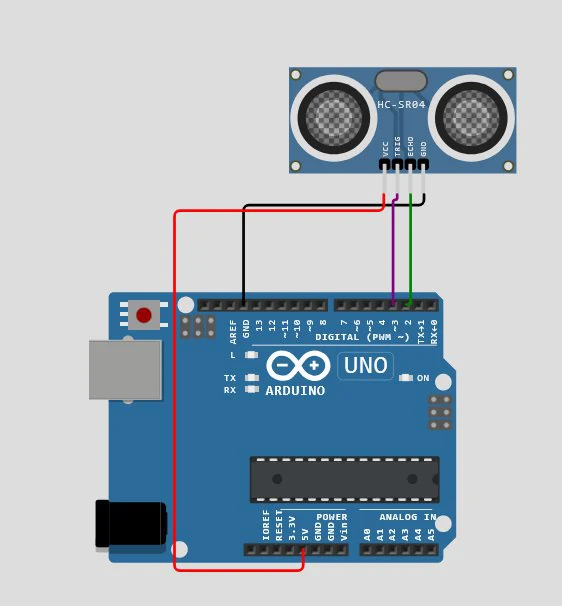
| HC-SR04 pin | Arduino pin |
|---|---|
| VCC | 5V |
| GND | GND |
| TRIG | Pin 3 |
| ECHO | Pin 2 |
#define trigPin 3
#define echoPin 2

void setup() {
  Serial.begin(9600);
  pinMode(trigPin, OUTPUT);
  pinMode(echoPin, INPUT);
}

void loop() {
  digitalWrite(trigPin, LOW);
  delayMicroseconds(2);
  digitalWrite(trigPin, HIGH);          // 10 µs trigger pulse
  delayMicroseconds(10);
  digitalWrite(trigPin, LOW);

  long duration = pulseIn(echoPin, HIGH, 30000);  // timeout 30 ms ≈ 5 m
  float distance = duration * 0.0343 / 2;         // cm
  Serial.println(distance);
  delay(200);
}import processing.serial.*;
Serial myPort;
float distance;
void setup() {
size(600, 200);
printArray(Serial.list());
myPort = new Serial(this, Serial.list()[0], 9600);
myPort.bufferUntil('\n');
}
void draw() {
background(255);
fill(0);
textSize(24);
text("Distance: " + nf(distance, 0, 2) + " cm", 50, 50);
fill(100, 200, 255); // horizontal bar
rect(50, 100, map(constrain(distance, 0, 200), 0, 200, 0, width - 100), 30);
}
void serialEvent(Serial p) {
String data = p.readStringUntil('\n');
if (data != null) distance = float(trim(data));
}Exercise 2 — Control the SG90 Servo from Processing
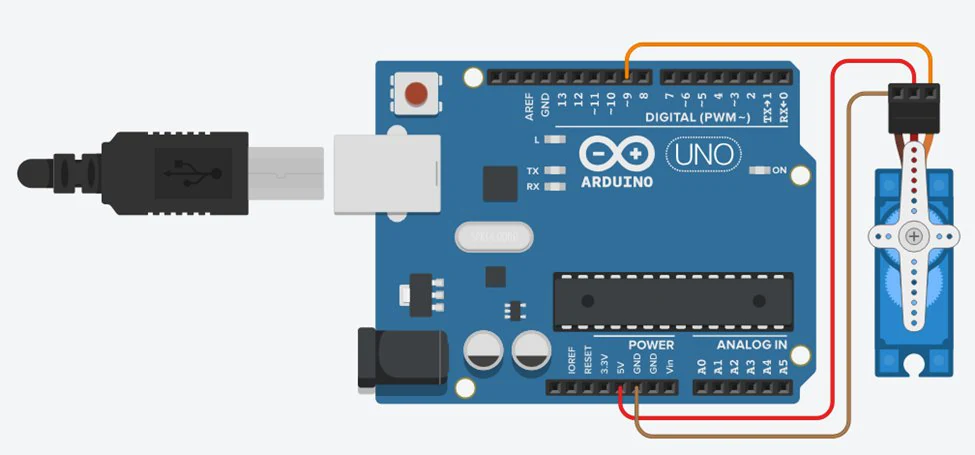
| Servo wire | Arduino pin |
|---|---|
| Signal (orange) | Pin 9 |
| VCC (red) | 5V |
| GND (brown) | GND |
Background reading: The Beginner’s Guide to Micro Servos — docs.arduino.cc/learn/electronics/servo-motors
#include <Servo.h>

Servo servo;
bool sweeping = false;
int angle = 0;
int step = 1;

void setup() {
  Serial.begin(9600);
  servo.attach(9);
}

void loop() {
  if (Serial.available()) {
    String command = Serial.readStringUntil('\n');
    command.trim();
    sweeping = (command == "1");      // "1" = START, anything else = STOP
  }

  if (sweeping) {                     // one small step per loop()
    angle += step;
    if (angle >= 180 || angle <= 0) step = -step;
    servo.write(angle);
    delay(10);
  }
}import processing.serial.*;
Serial myPort;
boolean isSweeping = false;
void setup() {
size(400, 200);
myPort = new Serial(this, Serial.list()[0], 9600);
textAlign(CENTER, CENTER);
}
void draw() {
background(240);
textSize(16);
fill(0);
text("Servo Control", width/2, 30);
drawButton("START", 100, 100, isSweeping);
drawButton("STOP", 250, 100, !isSweeping);
}
void drawButton(String label, int x, int y, boolean active) {
fill(active ? color(0, 200, 0) : color(180));
rect(x, y, 100, 40, 7);
fill(0);
text(label, x + 50, y + 20);
}
void mousePressed() {
if (mouseX > 100 && mouseX < 200 && mouseY > 100 && mouseY < 140) {
myPort.write("1\n");
isSweeping = true;
} else if (mouseX > 250 && mouseX < 350 && mouseY > 100 && mouseY < 140) {
myPort.write("0\n");
isSweeping = false;
}
}- ▸START sends
"1"→ Arduino begins sweeping the servo. - ▸STOP sends
"0"→ Arduino halts the movement immediately. - ▸Expand it with an angle slider, speed control or real-time feedback.
Exercise 3 — Ultrasonic Sensor Controlling the Servo
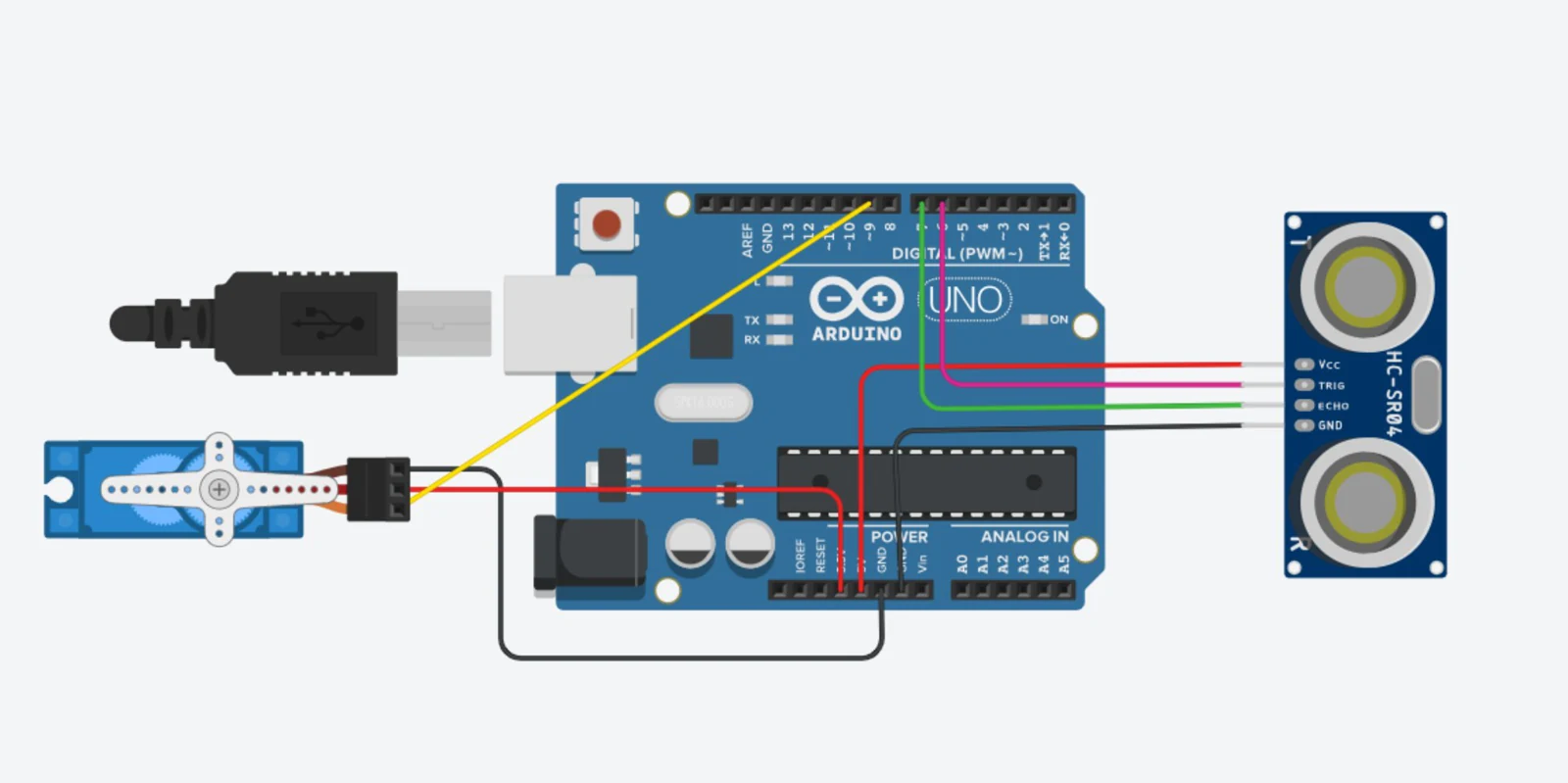
The servo turns to 90° when an object is closer than 50 cm and returns to 0° otherwise — like an automatic barrier.
#include <Servo.h>

const int TRIG_PIN = 6;
const int ECHO_PIN = 7;
const int SERVO_PIN = 9;
const int DISTANCE_THRESHOLD = 50;   // centimetres

Servo servo;
float duration_us, distance_cm;

void setup() {
  Serial.begin(9600);
  pinMode(TRIG_PIN, OUTPUT);
  pinMode(ECHO_PIN, INPUT);
  servo.attach(SERVO_PIN);
  servo.write(0);
}

void loop() {
  digitalWrite(TRIG_PIN, HIGH);      // 10 µs pulse
  delayMicroseconds(10);
  digitalWrite(TRIG_PIN, LOW);

  duration_us = pulseIn(ECHO_PIN, HIGH);
  distance_cm = 0.017 * duration_us; // = 0.0343 / 2

  if (distance_cm < DISTANCE_THRESHOLD) servo.write(90);
  else                                  servo.write(0);

  Serial.print("distance: ");
  Serial.print(distance_cm);
  Serial.println(" cm");
  delay(500);
}text() and (b) as a horizontal bar. Careful: this sketch sends distance: 23.4 cm, not just a number — see exercise P3.4.Exercise 4 — Build a Radar Scanner
The servo sweeps from 0° to 180°; at each step Arduino measures the distance and sends angle,distance. Processing converts each pair to an (x, y) point.
#include <Servo.h>

Servo myServo;
#define trigPin 9
#define echoPin 10

float measure() {
  digitalWrite(trigPin, LOW);
  delayMicroseconds(2);
  digitalWrite(trigPin, HIGH);
  delayMicroseconds(10);
  digitalWrite(trigPin, LOW);
  long duration = pulseIn(echoPin, HIGH, 30000);
  return duration * 0.0343 / 2;
}

void setup() {
  Serial.begin(9600);
  myServo.attach(6);
  pinMode(trigPin, OUTPUT);
  pinMode(echoPin, INPUT);
}

void loop() {
  for (int angle = 0; angle <= 180; angle += 2) {
    myServo.write(angle);
    delay(50);
    Serial.print(angle);
    Serial.print(",");
    Serial.println(measure());
  }
  for (int angle = 180; angle >= 0; angle -= 2) {   // sweep back too
    myServo.write(angle);
    delay(50);
    Serial.print(angle);
    Serial.print(",");
    Serial.println(measure());
  }
}import processing.serial.*;
Serial myPort;
int angle;
float distance;
void setup() {
size(600, 600);
myPort = new Serial(this, Serial.list()[0], 9600);
background(0);
}
void draw() {
if (myPort.available() > 0) {
String data = myPort.readStringUntil('\n');
if (data != null && data.contains(",")) {
String[] parts = split(trim(data), ",");
if (parts.length == 2) {
angle = int(parts[0]);
distance = float(parts[1]);
float r = map(distance, 0, 100, 0, 250);
float x = width/2 + r * cos(radians(angle));
float y = height - r * sin(radians(angle));
stroke(0, 255, 0);
fill(0, 255, 0);
ellipse(x, y, 5, 5);
}
}
}
}| Level | Task |
|---|---|
| Basic | Display distance as text on the radar screen |
| Intermediate | Draw radar grid lines and circles |
| Advanced | Colour-code dots by distance (green / yellow / red) |
| Challenge | Add sweep-line animation and a sound alert |
Student tasks
Troubleshooting
| Problem | Likely cause | Fix |
|---|---|---|
| Distance always 0 | No echo (timeout) or TRIG/ECHO swapped | Check pins; aim at a flat object 10–100 cm away. |
| Random big jumps | Soft or angled surfaces absorb/deflect sound | Use flat, hard targets; average 3 readings. |
| Servo jitters or Arduino resets | Servo draws too much current from USB | Power the servo from a separate 5 V supply (common GND). |
| Radar points drawn upside down | Y-axis points down on screen | Use y = cy − r·sin(θ). |
Exercises
Echo arithmetic
pulseIn() returns 1166 µs. (a) How far away is the object? (b) What echo time do you expect for an object 2 m away?
Why divide by two?
A classmate forgets the / 2 in the distance formula. What will their readings look like? Explain using a sketch of the sound path.
Temperature matters
The speed of sound depends on air temperature: v ≈ 331.3 + 0.606 × T (m/s, T in °C). At 0 °C and 35 °C, what distance would the sensor report for a real distance of 100 cm if the code always assumes 343 m/s?
Text in the numbers
Exercise 3 sends lines like distance: 23.4 cm. A student uses distance = float(trim(data)); in Processing and the bar never moves. Why? Fix it two ways: once in Arduino, once in Processing.
float("distance: 23.4 cm") returns NaN because the text isn’t a number. Fix A (Arduino): send only the number: Serial.println(distance_cm);. Fix B (Processing): extract it: String[] m = match(data, "([0-9.]+)"); if (m != null) distance = float(m[1]);Polar to screen
The radar centre is at (300, 600) and 100 cm maps to 250 px. Calculate the screen position of an object at angle 30°, distance 60 cm, and at angle 135°, distance 100 cm.
Full radar display
Build the complete radar: green grid arcs every 25 cm, angle lines every 30°, a sweep line following the current angle, a fading trail, and dots colour-coded by distance (red < 30 cm, yellow < 60 cm, green otherwise).
background(0) each frame, draw a translucent black rectangle (fill(0, 20); rect(0,0,width,height);) — older drawings slowly fade away.import processing.serial.*;
Serial myPort;
int angle = 0;
float distance = 0;
final float MAX_CM = 100;
float R; // radius in px
void setup() {
size(800, 450);
R = width / 2 - 20;
myPort = new Serial(this, Serial.list()[0], 9600);
myPort.bufferUntil('\n');
background(0);
}
void draw() {
noStroke();
fill(0, 18); // fading trail
rect(0, 0, width, height);
translate(width / 2, height - 10); // radar centre at the bottom
drawGrid();
stroke(61, 255, 154); // sweep line
strokeWeight(3);
line(0, 0, R * cos(radians(angle)), -R * sin(radians(angle)));
if (distance > 0 && distance < MAX_CM) {
float r = map(distance, 0, MAX_CM, 0, R);
if (distance < 30) fill(255, 60, 60);
else if (distance < 60) fill(255, 210, 60);
else fill(61, 255, 154);
noStroke();
ellipse(r * cos(radians(angle)), -r * sin(radians(angle)), 10, 10);
}
resetMatrix();
fill(61, 255, 154);
textSize(16);
text("Angle: " + angle + "\u00B0 Distance: " + nf(distance, 0, 1) + " cm", 20, 30);
}
void drawGrid() {
noFill();
stroke(61, 255, 154, 90);
strokeWeight(1);
for (int cm = 25; cm <= MAX_CM; cm += 25) {
float d = map(cm, 0, MAX_CM, 0, R) * 2;
arc(0, 0, d, d, PI, TWO_PI);
}
for (int a = 0; a <= 180; a += 30) {
line(0, 0, R * cos(radians(a)), -R * sin(radians(a)));
}
}
void serialEvent(Serial p) {
String data = p.readStringUntil('\n');
if (data == null) return;
String[] parts = split(trim(data), ",");
if (parts.length != 2) return;
angle = int(parts[0]);
distance = float(parts[1]);
}Self-check quiz
- Q01
What frequency does the HC-SR04 use?
- Q02
Why is the measured time divided by 2?
- Q03
Which library controls the SG90?
- Q04
A radar point at 90° is drawn…
- Q05
Why was the servo sweep rewritten as “one step per loop()”?
Real world & extensions
- +Sound effects or alarms when objects are detected
- +A fully animated radar interface with fading trail
- +Multiple ultrasonic sensors for wider coverage
- +A smart parking assistant with LEDs showing distance
- +Store radar scans for later analysis
- +An obstacle-avoidance robot
| Subject | Connection |
|---|---|
| Physics | Waves, speed of sound, reflection, temperature dependence |
| Mathematics | Trigonometry, polar → Cartesian coordinates, radians |
| Biology | Echolocation in bats and dolphins |
| Computer Science | Non-blocking code, protocols, event-driven UIs |
Reflection & conclusion
Bats “see” with sound. What are the advantages and disadvantages of sound compared with light for detecting objects?
Which surfaces were hard for your sensor to detect? Why?
Where could a radar like yours be useful at school or at home?
You explored ultrasonic sensing, real-time measurement, servo control and interactive visualization. Combining the HC-SR04, a servo and Processing, you built a working radar inspired by real sonar technology — and used physics, trigonometry and programming together in one system.